NetSuite ERP Modules: The Complete List & Guide
Every core NetSuite ERP module explained in plain English — what each one does, which ones your business actually needs, and how to roll them out without over-buying. Built by EPIQ Infotech, a certified Oracle NetSuite Alliance Partner.
Free 30-minute module-fit consultation · No obligation
Short answer: what are NetSuite ERP modules?
NetSuite ERP modules are the functional building blocks of the NetSuite cloud platform — separate applications for finance, inventory, order management, CRM, HR, e-commerce, manufacturing, and more that all share one real-time database. You license only the modules you need, then add more as you grow, without re-implementing or bolting on separate systems.
The core NetSuite modules fall into six families: Financials, Supply Chain & Operations, CRM & Commerce, People & Services, Analytics, and the SuiteCloud platform. Most companies start with Financials plus one operational module and expand from there.
What is a NetSuite ERP module?
A NetSuite ERP module is a self-contained application inside NetSuite that manages one business area — such as accounting, inventory, or CRM — while sharing a single database with every other module you’ve enabled. Because the data lives in one place, an order entered once flows automatically through inventory, fulfillment, billing, and financial reporting. There’s no re-keying, no overnight syncs, and no arguing about whose spreadsheet is right.
Here’s the useful way to picture it. NetSuite is the platform; the modules are the capabilities you switch on. A five-person startup might run just Financials and Inventory. A global manufacturer might run a dozen modules across finance, supply chain, and HR — all on the same instance. You’re never locked into a fixed bundle, and you’re never paying for capabilities you haven’t turned on yet.
That modular design is the whole point of choosing NetSuite over stitching together separate accounting, warehouse, and CRM tools. It grows with you instead of being replaced every few years. If you want the wider picture of where modules sit in a full deployment, our NetSuite implementation guide walks through the end-to-end rollout.
The full NetSuite modules list (2026)
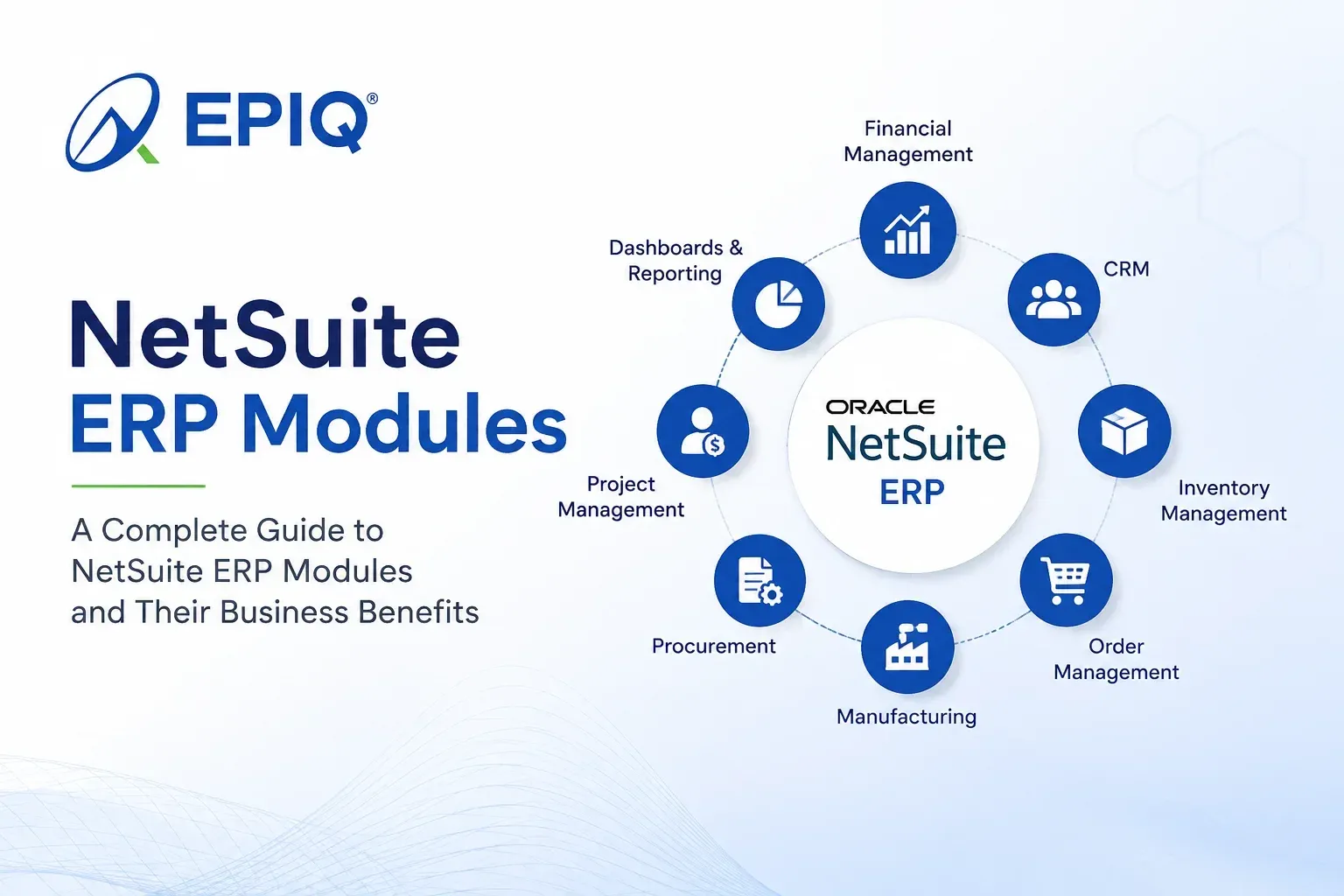
NetSuite’s modules group into six families. Below is a practical, current list of the modules businesses license most often — using NetSuite’s own product names so you can match them to a quote.
💰 Financials
- Financial Management — GL, AP, AR, close
- Planning & Budgeting (NSPB)
- SuiteBilling — subscriptions & usage
- Revenue Management — ASC 606
- Fixed Assets Management
- SuiteTax / Tax Management
📦 Supply Chain & Operations
- Order Management
- Inventory Management
- Warehouse Management (WMS)
- Procurement
- Supply Chain Management
- Manufacturing — incl. Advanced Mfg
- Demand Planning
🤝 CRM & Commerce
- CRM — sales, service, marketing
- SuiteCommerce — B2B/B2C e-commerce
- Marketing Automation
- Partner Relationship Management
👥 People & Services
- SuitePeople — HR / HCM & payroll
- SuiteProjects / PSA — services delivery
📊 Analytics & Global
- SuiteAnalytics — dashboards & KPIs
- OneWorld — multi-subsidiary & multi-currency
🛠️ SuiteCloud Platform
- SuiteFlow — workflow automation
- SuiteScript / SuiteApps — customization
- SuiteAnalytics Connect & integrations
Not sure which of these you actually need on day one?
Get a Free Module-Fit ReviewCore NetSuite modules explained
The modules most businesses touch first — what each one does and the problem it solves.
Financial Management
The backbone. General ledger, AP/AR, tax, multi-currency, and a faster, automated period close. Almost every NetSuite deployment starts here.
Inventory Management
Real-time stock visibility across locations, automated reorder points, demand-based planning, and accurate costing so you stop guessing.
Order Management
Turns quotes into orders into cash. Pricing rules, fulfillment logic, returns, and a clean handoff to inventory and finance.
Manufacturing
BOMs, routings, work orders, MRP, and quality checks. Advanced Manufacturing adds finite scheduling for complex shop floors.
Warehouse Management (WMS)
Bin tracking, barcode/mobile scanning, and pick-pack-ship workflows that cut errors and speed up fulfillment.
CRM
Sales pipeline, quotes, case management, and marketing — sharing the same customer record as your orders and invoices.
SuiteCommerce
B2B and B2C web stores wired directly into inventory, pricing, and orders, so the storefront is never out of sync.
SuitePeople (HR)
Core HR, payroll, time-off, and workforce analytics inside the same system that runs your finances.
SuiteAnalytics
Role-based dashboards, saved searches, and KPIs built on live data — no separate BI tool required to see what’s happening now.
NetSuite modules quick-reference table
A fast way to map a business need to the right module.
| Module | What it does | Best for |
|---|---|---|
| Financial Management | GL, AP/AR, tax, close, reporting | Every business |
| Inventory Management | Stock visibility, reordering, costing | Product / distribution |
| Order Management | Quote-to-cash, pricing, fulfillment | Sales-driven companies |
| Warehouse (WMS) | Bin, barcode, pick-pack-ship | High-volume fulfillment |
| Manufacturing | BOMs, MRP, work orders, quality | Manufacturers |
| CRM | Pipeline, cases, marketing | Growing sales teams |
| SuiteCommerce | B2B/B2C web store integration | Online sellers |
| SuitePeople (HR) | Payroll, HR, workforce analytics | Scaling headcount |
| SuiteProjects (PSA) | Resourcing, time, project billing | Services firms |
| SuiteAnalytics | Dashboards, KPIs, live reporting | Every business |
| OneWorld | Multi-subsidiary & multi-currency | Global / multi-entity |
Choosing NetSuite modules: your questions answered
Which NetSuite modules do I need?
Start with the modules that map to your revenue engine, not the longest feature list.
For most companies that means Financial Management first (you always need the ledger), plus the one operational module that runs your core business — Inventory for distributors, Manufacturing for makers, SuiteProjects for services firms, SuiteCommerce for online sellers. Add CRM and SuiteAnalytics early because they touch every team. Everything else can wait until a specific pain point — a slow close, payroll errors, stockouts — justifies it.
NetSuite module selection guide (a 4-question filter)
Pick modules by answering four questions in order: How do we make money? Where does it break today? What has to be live at go-live? What can wait a phase?
Run every candidate module through that filter. If a module doesn’t tie to revenue, isn’t causing pain, and isn’t needed at go-live, it belongs in phase two. This keeps your first implementation lean, faster to launch, and cheaper — and it’s exactly the framework our NetSuite consulting team uses in a scoping workshop.
NetSuite modules for manufacturing
Manufacturers typically run Financial Management, Manufacturing (with BOMs, routings and MRP), Inventory, Warehouse Management, Procurement, and Demand Planning as their core stack.
Advanced Manufacturing adds finite scheduling and shop-floor control for more complex operations, while SuiteAnalytics gives production and finance a shared view of cost and throughput. See how it comes together on our NetSuite for manufacturing page and the SuiteSuccess for manufacturing pre-built configuration.
NetSuite modules for wholesale distribution
Distributors get the most value from Inventory Management, Order Management, Warehouse Management (WMS), Procurement, and Financial Management, with Demand Planning to keep stock levels tight.
Add SuiteCommerce if you sell online and CRM to manage reorders and account relationships. The payoff is one live view of stock, orders, and margin across every location — more on our NetSuite for wholesale distribution page.
NetSuite ERP modules for growing businesses
Growing businesses should start lean — Financials, one core operational module, CRM and SuiteAnalytics — then layer on modules as new pain points appear.
Because NetSuite is modular and cloud-native, adding SuitePeople, WMS, or SuiteCommerce later is a configuration project, not a re-platforming. That’s the advantage of buying a suite you can expand instead of a fixed bundle you’ll outgrow. If you’re weighing the numbers, our 2026 NetSuite pricing breakdown shows how module choices affect cost.
Can I upgrade NetSuite with additional modules later?
Yes — you can add NetSuite modules at any time without reimplementing, and the new module plugs straight into your existing data.
Because everything runs on one instance and one database, enabling a module like WMS or SuiteBilling is a scoped configuration and enablement project rather than a new system. Our NetSuite managed services team handles these phased add-ons so your live operations aren’t disrupted.
Get your NetSuite modules implemented right
Choosing modules is step one. Configuring, customizing, and optimizing them for how you actually work is where EPIQ — a certified Oracle NetSuite Alliance Partner — comes in.
Module Implementation
Scope, configure and go live on the right modules with a phased, low-risk rollout.
NetSuite Implementation Services →Module Customization
SuiteScript, SuiteFlow and tailored records that make modules fit your process.
NetSuite Customization Services →Module Consulting
Independent advice on which modules to buy, when, and in what order.
NetSuite Consulting Services →Optimization & Support
Ongoing tuning, add-on modules and issue resolution to lift ERP ROI.
NetSuite Managed Services →Already on NetSuite but not getting the value you expected?
Book a NetSuite Health CheckHow to choose the right NetSuite modules
Map revenue
List the processes that directly make or protect money. Those define your must-have modules.
Find the pain
Where do errors, delays and manual work pile up today? Match each to a module.
Phase it
Go live with the essentials. Schedule the rest for phase two once you’re stable.
Plan to scale
Pick modules that support where you’ll be in three years, not just today.
Benefits of NetSuite’s modular approach
One source of truth
Every module reads and writes the same live data — no reconciling spreadsheets.
Buy only what you need
License modules as you go, so cost tracks the value you’re actually getting.
Scale without re-platforming
Add modules to the same instance instead of ripping and replacing systems.
Real-time decisions
Dashboards reflect what’s happening now, not last month’s export.
Fewer integrations to break
Native modules mean fewer brittle connectors between disconnected apps.
Cleaner compliance
Shared audit trails and role-based access across every module.
Related NetSuite resources
NetSuite Implementation Guide
Steps, timeline and cost for a full NetSuite rollout in 2026.
Read the guide →NetSuite Pricing 2026
How modules, users and implementation shape the total cost.
See the breakdown →Configuration vs Customization
When to configure a module and when to customize it.
Compare approaches →The ERP Ecosystem
How NetSuite fits alongside your other business systems.
Explore the ecosystem →NetSuite Optimization Framework
A diagnostic approach to getting more from the modules you own.
See the framework →NetSuite Support Services
Ongoing help keeping your modules healthy and users productive.
View support options →NetSuite modules: frequently asked questions
How many modules does NetSuite have?
NetSuite offers 20+ modules grouped into six families: Financials, Supply Chain & Operations, CRM & Commerce, People & Services, Analytics & Global, and the SuiteCloud platform. You license only the ones you need and add more over time.
What is the difference between a NetSuite module and a SuiteApp?
A module is native NetSuite functionality you enable on your account (for example, Inventory or SuitePeople). A SuiteApp is an add-on built on the SuiteCloud platform — either by Oracle or a third party — that extends NetSuite for a specific need, such as an industry vertical or a specialized integration.
Which NetSuite module should I implement first?
Financial Management almost always goes first. It establishes the general ledger, compliance and reporting foundation that operational modules like Inventory, Manufacturing and CRM build on.
Do all NetSuite modules share the same database?
Yes. Every enabled module reads from and writes to one unified, real-time database. An update in one module — a shipped order, a posted invoice — is instantly reflected everywhere else, with no syncing or duplicate entry.
Can I add NetSuite modules after go-live?
Absolutely. Adding a module is a scoped configuration project on your existing instance, not a reimplementation. Many companies deliberately start lean and add modules like WMS, SuiteBilling or SuiteCommerce in later phases.
What NetSuite modules do manufacturers need?
A typical manufacturing stack is Financial Management, Manufacturing (BOMs, routings, MRP), Inventory, Warehouse Management, Procurement and Demand Planning, often with Advanced Manufacturing for complex scheduling. See our NetSuite for manufacturing page for detail.
How do NetSuite module costs work?
NetSuite pricing combines a base platform license, the modules you enable and your user count, typically as an annual subscription. Because you pay per module, cost scales with the capabilities you turn on. Our 2026 pricing breakdown explains the components.
Do I need a partner to set up NetSuite modules?
You can enable modules yourself, but configuring them to match your processes — and avoiding costly rework — is where a certified partner earns its keep. EPIQ provides implementation, customization and consulting across the full module set.
Not sure which NetSuite modules are right for you?
Get a free 30-minute session with an EPIQ NetSuite consultant. We’ll map your processes to the right modules and give you a phased, no-nonsense plan — whether you’re new to NetSuite or expanding what you already run.

Santosh Krishnamoorthy is a Principal ERP Consultant at EPIQ Infotech, with extensive experience in NetSuite and enterprise systems. He works with finance and operations teams to improve reporting accuracy, streamline workflows, and build ERP environments that support sustainable growth. His writing focuses on practical insights drawn from real implementation and support experience.
Free Consultation
Talk to a NetSuite Expert
Response within 1 hour